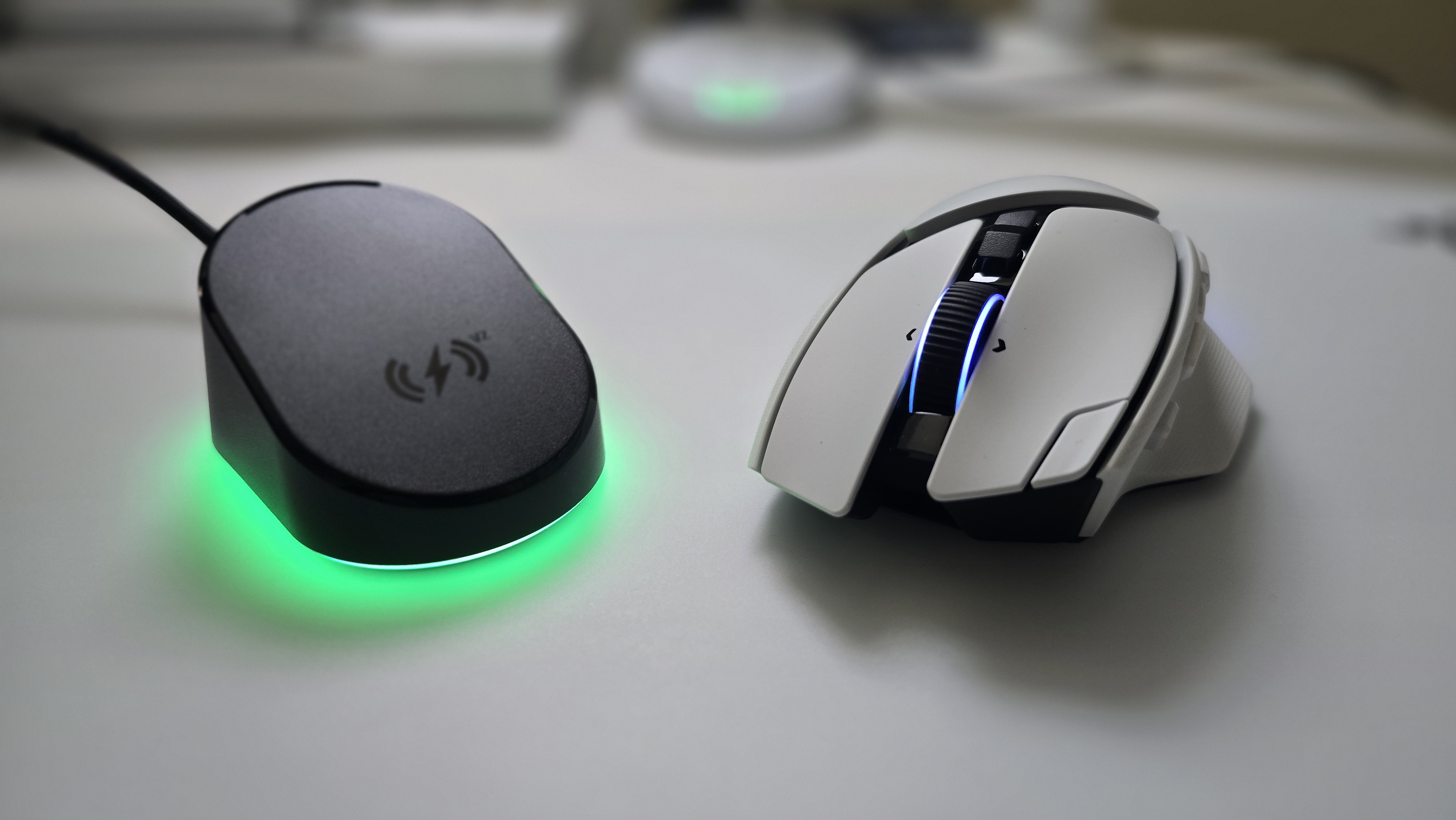

My recent Razer product reviews have covered different approaches to giving players more control. The Viper V4 Pro impressed me with its lightweight design and competitive focus. The Huntsman V3 Pro Low-profile offered extensive control over individual inputs, while the Tartarus V2 Pro appealed to my background as a controller player. The Basilisk V4 Pro brings that interest in customization into a mouse with considerably more utility.
Now, I personally never got to try the Basilisk V3 Pro when it launched back in 2022 or the updated version in 2024, so this took some learning on my part. There are enough buttons and assignments here that becoming familiar with the layout requires attention. I had to get comfortable with having more commands available under one hand. That adjustment was worthwhile, though. The Basilisk V4 Pro is a very comfortable mouse, and the amount of functionality available is what I appreciate most about it. This review also has Razer’s Mouse Dock Pro which is sold separately.
Build Quality and Design

The Basilisk V4 Pro uses a reshaped, right-handed ergonomic design with a substantial thumb rest. Its black model weighs 100g, while the white version comes in at 101g. That makes it lighter than the 112g Basilisk V3 Pro 35K, although it remains a considerably heavier mouse than the Viper V4 Pro I reviewed. The extra controls and fuller shape give it a different appeal, particularly for players who prioritize comfort and functionality.
Comfort has been a strong point during my use. A mouse can offer an impressive number of buttons and still become frustrating if the shape and button placements does not work for your hand. The Basilisk’s shape works well for me, which made spending time learning the controls easier to appreciate. Seven-zone Chroma lighting and full underglow give it the familiar Razer presentation, with lighting extending beyond the areas covered by your grip.
Specifications
- Form Factor: Right-handed ergonomic
- Weight: 100g in black; 101g in white
- Sensor: Razer Focus Pro 50K Optical Sensor Gen-3
- Maximum Sensitivity: 50,000 DPI
- Maximum Tracking Speed: 930 IPS
- Maximum Acceleration: 90G
- Polling Rate: Up to 8,000 Hz wired and wireless
- Controls: 14 customizable inputs with HyperShift support
- Switches: Razer Optical Mouse Switches Gen-4, rated for 100 million clicks
- Scroll Wheel: HyperScroll Tilt Wheel Gen-2 with Tactile, Precision Tactile, Free-Spin, and Smart-Reel modes
- Connectivity: HyperSpeed Wireless Gen-2, Bluetooth with three device slots, and USB wired
- Rated Battery Life: Up to 200 hours at 1,000 Hz wireless, 54 hours at 8,000 Hz wireless, or 275 hours over Bluetooth
- Onboard Memory: Five profiles
- Mouse Feet: 100% PTFE
- Wireless Charging: Supported through compatible accessories sold separately
- RAZER Mouse Dock (Sold Seperately)
- Mouse Dock Pro MSRP: $69.99
- Basilisk V4 Pro MSRP: $169.99
The 14 customizable controls are the main reason the Basilisk deserves consideration. That count includes the wheel inputs, alongside additions such as the edge button beside the main left click and a third side button. The multifunction trigger also returns, while HyperShift provides access to a secondary set of assignments. There is room to organize commands around the games and applications you actually use.
The learning curve was real for me, but it came from getting accustomed to the available options. More buttons require more familiarity, especially when you already have established habits with another mouse. I appreciate the utility because it gives me choices about where commands belong. You do not need to assign every available input immediately to find value in the layout. The HyperScroll Tilt Wheel Gen-2 adds useful flexibility of its own. Standard Tactile mode provides 24 steps per rotation, while Precision Tactile increases that to 48. Free-Spin supports continuous scrolling, and Smart-Reel automatically transitions between tactile and free-spinning behavior according to scroll speed. Those options make sense across inventory navigation, weapon selection, and long documents. Synapse also lets you adjust Smart-Reel’s switching threshold.
Performance and Everyday Utility

Razer has equipped the Basilisk with its current flagship sensor and wireless technologies. The Focus Pro 50K Gen-3 sensor, HyperSpeed Wireless Gen-2, and Gen-4 optical switches provide a familiar foundation following my Viper V4 Pro review. Features such as Sensitivity Matcher and Mouse Rotation offer ways to tailor the input to your existing habits. The maximum DPI figure attracts attention, but those adjustments are more relevant to how someone might settle into a new mouse.
Polling reaches 8,000 Hz in both wired and wireless modes. There is a meaningful battery tradeoff: Razer rates wireless runtime at up to 200 hours at 1,000 Hz and 54 hours at 8,000 Hz. Those are manufacturer estimates rather than my own battery measurements—I found that during my usage at 8KHz wireless that I needed a charge after 2 days without precise testing and normal game time. Automatic polling-rate switching provides a way to use different settings in and outside games, giving you some control over that balance. Connectivity also contributes to the Basilisk’s usefulness. Alongside the wireless dongle and wired connection, it can retain pairings for three Bluetooth devices. That gives someone working across a desktop, laptop, and tablet several ways to use the same mouse. Wireless charging is another option through Razer’s Mouse Dock Pro—as I mentioned before, it is sold separately. What this dock allows that’s really neat is the function to connect 2 separately devices into its receiver, leaving room for less clutter.

Comfort and utility are the strongest reasons I would recommend the Basilisk V4 Pro. The controls provide considerable room for customization, and the scroll wheel offers practical options for both gaming and everyday use. Razer has included its advanced performance features without making the mouse’s appeal depend entirely on sensor specifications. The main considerations are weight, price, and the time needed to learn the layout. At around 100g, this will not satisfy someone specifically shopping for an ultralight mouse. The $169.99 asking price also makes more sense if you intend to use the additional functionality. I found the adjustment worthwhile, but a player who only needs a few inputs may prefer something simpler.
REVIEW SCORE: 9.5/10
The Basilisk V4 Pro gives me the combination of comfort and utility I want from a mouse with this many features. Learning the buttons took some effort, but that effort helped me appreciate what the design offers. The scroll-wheel options, customizable controls, and flexible connectivity give it uses that extend well beyond a single game.
Razer’s latest sensor, switches, and wireless platform complete a compelling package. The weight and accessory costs deserve consideration, but they do little to diminish my overall impression. For players who want extensive control in a comfortable ergonomic shape, the Basilisk V4 Pro is an excellent choice.
For more on RAZER and gaming, follow my socials here – I also stream Mon | Weds | Fri-Sat @9pm ET over on Twitch, TikTok, and YouTube

