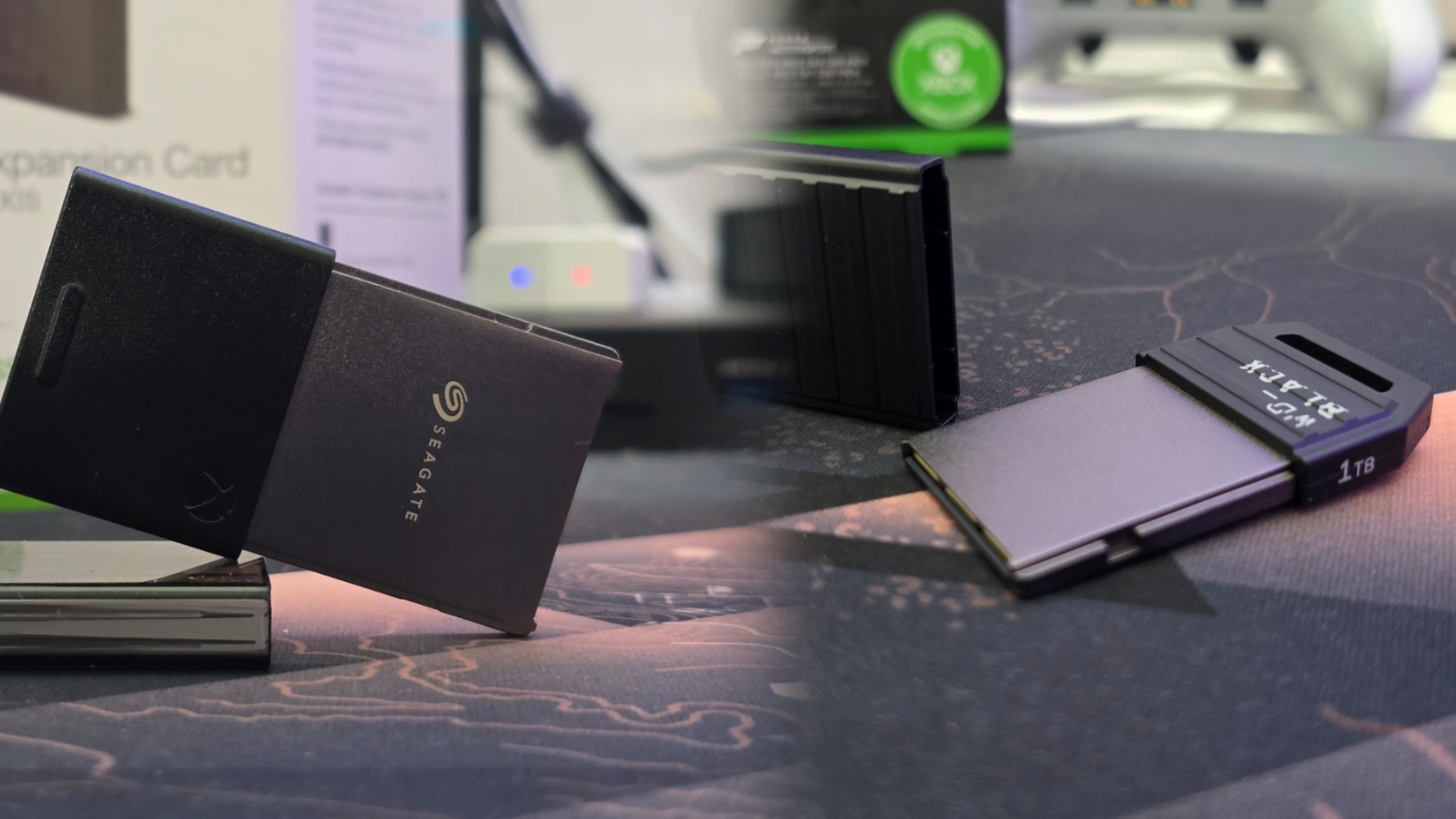

When Microsoft launched the Xbox Series X|S, one of the standout features was the custom NVMe storage solution. To deliver lightning-fast load times, seamless asset streaming, and the much-touted Quick Resume feature, the consoles were built around a proprietary storage architecture called the Xbox Velocity Architecture. Part of that included a dedicated slot for Expansion Cards—compact, plug-and-play SSD modules designed to match the internal drive’s performance without the complications of manual upgrades.
At first glance, it may seem that all Expansion Cards are the same. After all, they all plug into the same port and promise the same performance. But when you dig into the details—especially across the Seagate and WD_BLACK models—you’ll notice subtle differences worth considering, especially if you’re particular about speed, heat, or value over time.
Understanding the Expansion Card Ecosystem
Microsoft’s decision to go with a proprietary form factor was intentional. It simplifies upgrades by eliminating variables: no need to worry about SSD length, heatsink clearance, or PCIe lane compatibility. Just slide the card in, and you’re good to go. But that also means every Expansion Card must meet Microsoft’s strict specifications, which includes:
- PCIe Gen4 NVMe connectivity
- Full compatibility with the Xbox Velocity Architecture
- Support for next-gen features like Quick Resume and DirectStorage
- Seamless integration with the Xbox OS, behaving exactly like the internal SSD
From a baseline standpoint, this means that whether you pick up the original Seagate model or the newer WD_BLACK version, you’re promised a consistent gaming experience. Games will load just as fast, and performance across titles will be indistinguishable to the average user.

Seagate was Microsoft’s launch partner for the Xbox Series X|S Expansion Card, debuting with a 1TB model and eventually expanding to 512GB and 2TB variants. Having used the 1TB version extensively since launch, I can confidently say that its performance is extremely close to that of the internal drive. Load times are nearly identical, and switching between Quick Resume titles is as smooth as advertised.
That said, in long play sessions or during large file transfers—moving a 100GB game, for instance—I noticed the card ran a bit warmer than expected. It never caused any issues, but depending on your setup (especially if your Xbox is tucked into a tight cabinet), this could matter over time. Transfer speeds were solid, though not always snappy when moving multiple games in bulk between internal and external storage.
WD_BLACK C50 Expansion Card: The Newer Contender

WD_BLACK joined the Xbox Expansion Card ecosystem later with its C50 series. Available in the same capacities as Seagate’s offerings, the C50 boasts the same internal performance targets, but brings a slightly different engineering approach.
During side-by-side testing, I noticed that the C50 handled large game transfers slightly faster—typically shaving off a few seconds when moving files over 100GB. It’s not a dramatic difference, but it’s repeatable. The card also seemed to maintain more consistent thermals, which may contribute to its slightly improved sustained throughput during heavy use.
Western Digital has years of experience crafting premium SSDs, and it shows here. While the improvement is incremental, it does reflect subtle advantages in controller design and firmware optimization. In actual gameplay—launching titles, resuming suspended games, or loading into open-world maps—you’re not going to see any difference between Seagate and WD_BLACK cards. They both adhere to Microsoft’s performance floor and ceiling, so the experience remains uniform across the board.
Where differences appear is in power user scenarios:
- Moving large libraries between internal and expansion storage
- Heat dissipation during sustained data activity
- General responsiveness during rapid-fire game management
These are minor, but they exist. If you frequently juggle large game files, or like to manage your storage like a power user would on PC, the WD_BLACK’s slightly better throughput and thermals may be worth the consideration.
Which Should You Choose?
While you can’t go wrong with either, here’s how I’d frame the choice:
Go with Seagate if:
- You find a good deal or bundle (it’s often on sale)
- You want a proven, day-one product with broad community use
- You don’t regularly transfer massive files between drives
Go with WD_BLACK if:
- You’re buying new and want the latest iteration
- You transfer games often and want marginally faster speeds
- You value longer-term thermal performance and reliability

Ultimately, both are officially licensed and perform identically where it matters most: in the games themselves. The Xbox Series Expansion Cards deliver on Microsoft’s promise of hassle-free storage upgrades without compromising performance. Whether you go with Seagate or WD_BLACK, you’re getting fast load times, seamless gameplay, and effortless compatibility. The differences between the two are subtle and mostly relevant in edge cases, but they do exist—especially if you care about transfer speeds and thermals. Reliable, high-speed storage with a premium price tag. Slight thermal and transfer improvements make the WD_BLACK a refined alternative, but either card will deliver a top-tier experienc
Personally, I opted for the WD_BLACK on my Series X. Not because the Seagate was lacking—but because I move games around frequently, and those few seconds saved in transfer times start to add up when you’re juggling hundreds of gigs. It’s a minor win, but one I’ve grown to appreciate.
For more on Expansion Cards and gaming, follow my socials here – I also stream Mon | Tues | Thurs | Fri @10pm ET over on Twitch, Tiktok and Youtube

