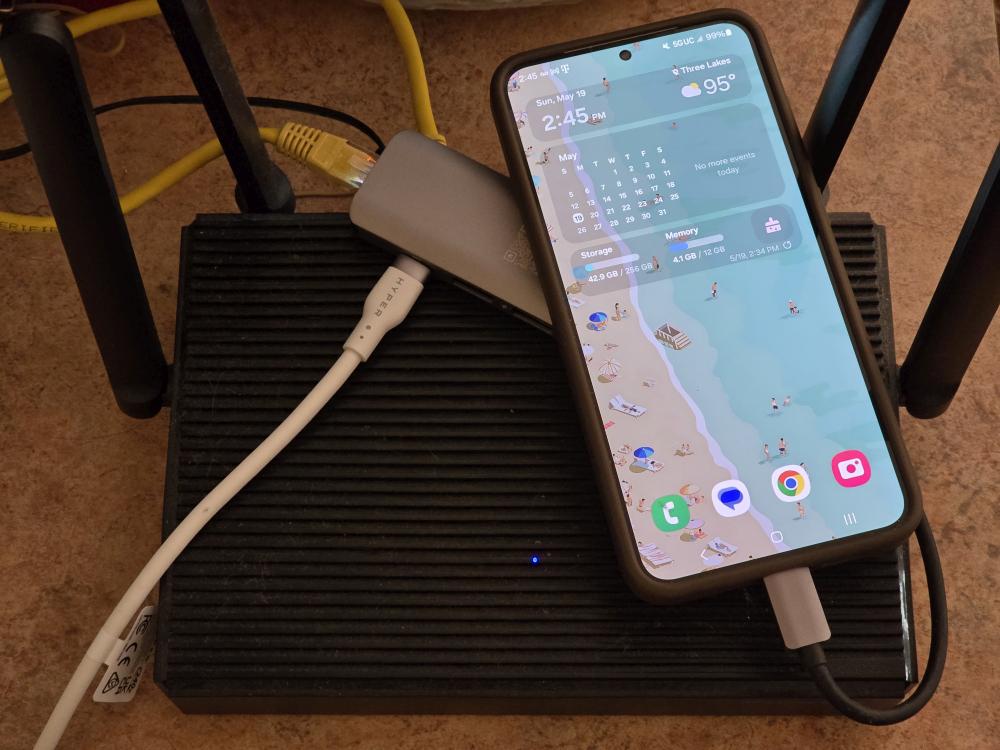

At home, I use AT&T Fiber and have been using it for many years without issue until last night. That’s because the modem finally decided to die. Many of you may have experienced the same thing with your internet modems, where only the power light comes on. Cycling power does nothing and service of any type does not want to initiate. So what next? I had to order a new modem, but what do I do in the meantime? I have so many other devices at home that rely on the internet so my only option was to use my mobile phone, specifically a Samsung Galaxy S24 Plus provided by T-Mobile for one of our previous reviews.

I already knew the phone got decent speeds from T-Mobile in my area, so I just needed a way to connect all my devices to it. I know you can use the mobile hotspot with the Galaxy S24 Plus, but I didn’t want to kill the phone either, as it can get pretty hot when doing that. Instead, I discovered that you can use Ethernet Tethering and plug the phone directly into a router. Why would I choose to do this?
Simple. My router’s SSID and password are already set up on all my devices which means I don’t have to go through the hassle of trying to connect everything to a mobile hotspot from scratch.
Setting this up is also not as difficult as it may sound. All you need is a mobile device that supports Ethernet Tethering, a USB-C hub with an Ethernet port and a USB-C PD port for charging, and an Ethernet cable. So for this setup, I’m running the following:
The setup doesn’t look that neat, and that’s fine since this is just a temporary setup. What it is, though, is effective, and it works. Plug your phone into the USB-C hub and the hub into your router. Then, you will need to go into your connection settings on your device (in my case, it is under Settings > Connections > Mobile Hotspot and Tethering on the Galaxy S24 Plus) and turn on Ethernet Tethering. If you plan on having this plugged in for an extended time, plug in a USB-C charging cable.

This setup actually works quite well and the speeds I was getting weren’t to bad either. The connection also seemed really stable with all the devices I had connected to the router.
With that said, as a temporary solution, Ethernet Tethering worked quite well and the Samsung Galaxy S24 Plus on T-Mobile’s network worked in a pinch. I’m able to stay online until my new modem arrives, so in the future, at least I know I have a reliable solution in case my home Internet ever goes down again.

