

By 2025, we’re all familiar with robots that handle household chores, from vacuuming to mowing the lawn. The robotic lawn mower market, in particular, has exploded, with companies setting themselves apart through different navigation methods like pure vision or RTK GPS. But what about a robot that’s useful year-round, one you don’t just put away after summer? That’s where the Yarbo Modular Yard Robot stands out. It’s not just another lawn mower; it’s a versatile machine with swappable modules for mowing, leaf blowing, snow plowing, and even patrolling your property. Let’s take a closer look.
This is where Yarbo and their Modular Yard Robot come in. Not just content with being another lawn mower, the Yarbo Core, their robot, is equipped with a variety of talents, depending on the module installed. We’ll talk about these, but TLDR, it can mow your lawn, blow you leaves away, plow & blow your snow out, help you transport items around your lawn, and if you so incline, maybe even tow your car or boat to a different spot if you need it to. Oh, and patrol your property as well. Yes, the Yarbo Modular Yard Robot wants to serve many functions for you. Let’s talk about it.
Configuring What You Need & Setup

Okay, so let’s talk about the setup process for the Yarbo modular yard robot. I will tell you right off the bat, Yarbo is going to make you do the most work! As I have been reviewing several other devices in this category, Yarbo is the most labor-intensive. Not only is the Yarbo the heaviest and built like a tank (which does have its advantages later on), but it also has so many pieces to put together. This is like the Legos of the yard/mower robots. I give them major points for packing all of the parts well and with everything precisely labeled. Depending on what modules you purchased with the core, it will come in several boxes, so make sure you have a good working space to sort and put them all together.
As we are in the spring/summer time, we are currently using the lawnmower module. Each starting point is the same as the Core, however. The Core itself isn’t too bad. You install the battery, a couple of antennas, and the Smart module, and you are ready to go with the robot itself. However, the Yarbo uses an RTK antenna as well, and with it a Data Center that must be mounted in a good space for GPS signals, and connected to your home internet. Now, if this were a wireless connection, the process would have been a little smoother, but it must be connected via a LAN connection. They give you a 100-foot cable, which you’ll need if you need to plug it somewhere in your home, all the way to wherever you will mount the Data Center antenna. This will be a pain point for anyone, unless you somehow have your main modem or router located outside your home. While the lengthy cable helps, as you may need to traverse distances to get the best mounting position, this becomes a challenge with the excess cable in my situation, as I was able to connect it to an EERO module in my shed, eliminating the need to run so much cable. While I’ll eventually clean this up, purchasing my own needed size LAN cable for the location, for the sake of this review, I have way too much cable hiding behind a box currently.

Okay, once we get the Data Center installed, it is time to connect the lawn mower module to the Core. The steps are easy enough, and Yarbo does a great job with their quick start guides and full manuals. A few pieces to put on, and then connect them to the Core. The Core itself is pretty heavy, and the lawnmower module isn’t light either. Lifting the module to connect it to the Core is not light work, but once it is all connected, you are finally ready to go. Now, up until this point, you’ve just been putting it together. We haven’t even gotten to mapping it around its work areas, pathways to the base station, no-go zones, and the rest.
Setting Up Your Work Areas
Once you have the Yard modular robot all together, with the module of choice (currently we have the lawnmower module), you’ll need to map out your work areas. For my review, I’m using the lawn at my home. I have a front and back yard, with some slopes, and let’s say undesirable spots between them. You’ll first need to draw out the perimeter of your areas, which you do by walking (rolling) it around your yard perimeter. Once you have completed this, you will need to use a template or use the Yarbo robot to draw by moving it around the perimeter of your no-go zones. You’ll additionally need to walk/roll it from the base station to your work area to create your pathways from the base station, or work area to your work area. Prepare to get your steps in this day, as depending on how large your area is, this can be a short trip or one that qualifies as a workout for the day.

Once you have completed this, from the Yarbo app, you can do things like create work plans and schedules. You’ll be able to dial in settings like how high you want the grass cut, obstacle avoidance, patterns, and even how you want it to turn as it works. The app is pretty robust in the settings you can configure, allowing you to get the cut you need for your lawn.
So, Does It Actually Save You Time?
Now this is where we get to the meat and potatoes of this. The value proposition is that if you pick up one of these, you’ll save time that can be better placed elsewhere, while the Yarbo modular robot can take on tasks like lawn-mowing, clearing your driveway of snow, cleaning up leaf litter, and even helping you around the lawn when you do need to do some where by carrying supplies. After all the time spent putting the pieces together, walking it around to create the work areas for it, and configuring all the settings, are you able to just kick back and let it do its thing?
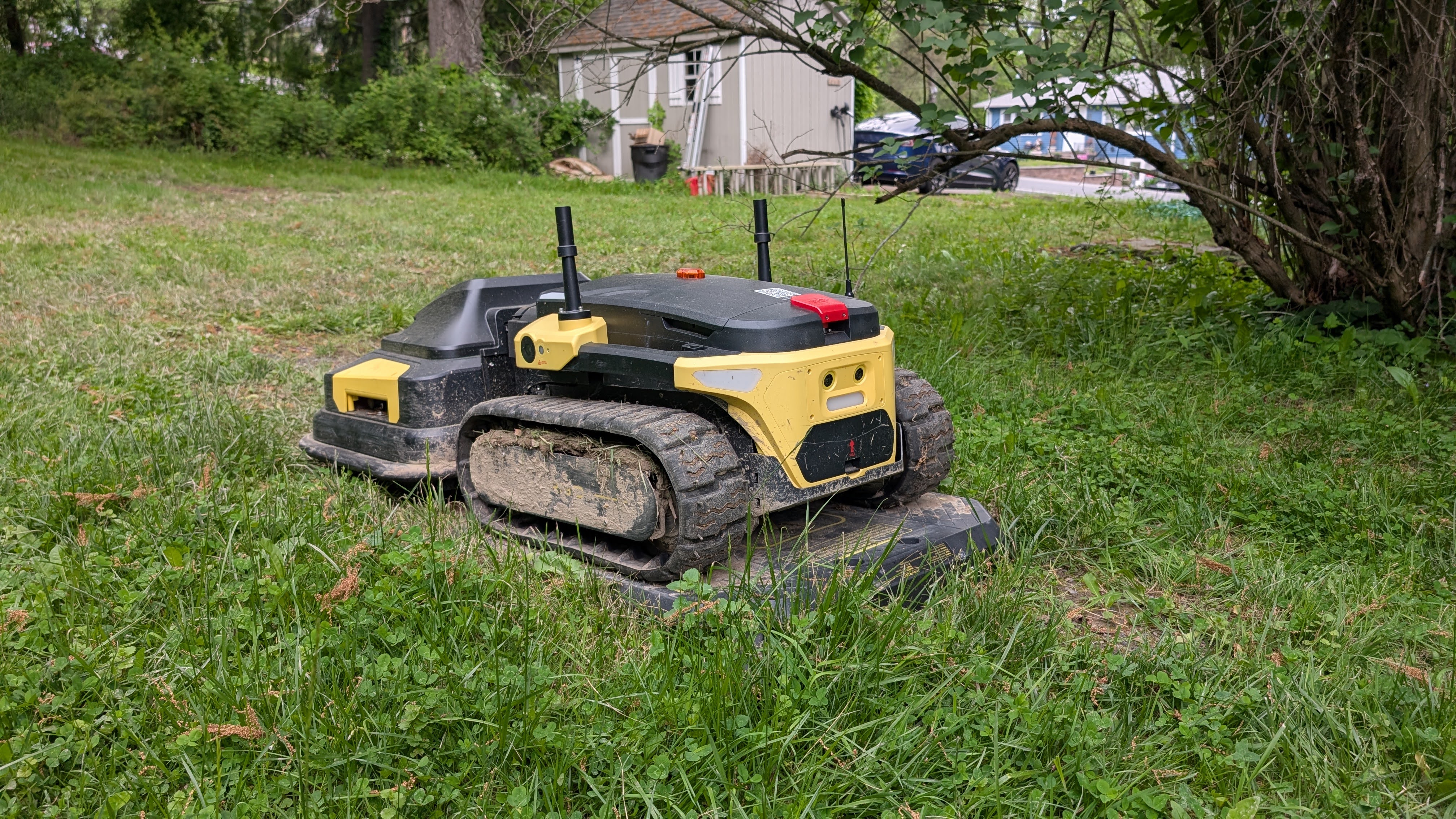
The short answer is yes and no. For the sake of this current review, we’ll talk specifically about the lawnmowing function. I’ll come back in the fall and again in the winter to talk about those. Now, for the lawnmowing, has it saved me time? Yes, anytime I don’t need to spend mowing the entirety of the grass myself is wonderful. Not having to pay a company to come over and do it as well is a nice plus. I’ve been using the Yarbo since the beginning of the cutting season, and as we are getting to the point where we will start to slow down in another month or so, it has hit its stride. In the beginning, I spent way too much time intervening with it, helping it out of tough spots, navigating it into an “open area” so it could regain GPS signal again, or navigating it manually out of areas that it really could have done itself. In the beginning, there was definitely a lot of hand-holding and a lack of confidence that it could complete a total job without needing me to do something or keep spot-checking it. Here are some of the most common issues I ran into:
- Weight: The Yarbo is a tank. While its weight helps it tackle slopes and rough terrain, it also makes it a serious workout to pull out of a muddy patch.
- GPS Signal Loss: This was my biggest complaint. Even with the Data Center antenna in a good spot, the Yarbo would randomly lose its GPS signal and stop, requiring me to manually navigate it to an open area. While a future update may address this, it was a frustrating issue.
- Obstacle Avoidance: I’ve noticed the Yarbo running into things more often than I’d like. This happened to me with a car, which my wife won’t let me forget about. It’s an area the team continues to work on, but it makes me hesitant to let it run when I’m away from the house.
Okay, so those were some of my complaints, but the Yarbo still is one of the current yard robots that I favor in my list of the ones I’ve reviewed so far. The Yarbo modular robot is still the most unique of the others I’ve reviewed. In terms of this summer, here are some of the reasons I so far prefer Yarbo over some others.
- The Yarbo Core + Lawnmower module is a tank. Yes, this presents some weight issues if I needed to drag it anywhere, but that same weight and tracks for mobility have let it tackle any kind of lawn I’ve thrown at it so far. Slopes have been no problem. Areas where there might have been some divets and rungs, it rolled over them with ease. There were points where I even sent the Yarbo over to my neighbor’s yards to get spots for another robot mower that is being reviewed wasn’t able to handle or kept getting stuck. The Yarbo had very little difficulty with the majority of areas I needed to cut.
- Yarbo’s additional manual control via a modified game controller. While all of the lawnmowers I’ve reviewed so far let you also control them manually, this is only via the app for them. Yarbo does this as well, but also has a gaming controller for it. This is a welcome addition, as sometimes I don’t like having to use a control via a smart screen to control the mower. The gaming controller adds a nice touch in this regard. Giving me a more tactile feel when I need to use it.
- The Yarbo team’s commitment to updates. The team sends weekly updates and has been consistent with the software updates. From the start of the cutting season until now, only been getting better as it goes along. This is why they have stayed as a favorite. A continuous cycle of improvement!
Should You Get One?

So, after all the setup and trial and error, is the Yarbo worth it? Honestly, yes. My experience has only gotten better as the team has released consistent software updates. While I still need to handle trimming the edges, and GPS signal loss is a concern, the Yarbo is a unique and reliable solution. It’s definitely an investment at $4,999, but you’re buying into a year-round ecosystem, not just a seasonal gadget.
Here’s a quick look at the pros and cons:
Pros:
- True Versatility: The modular design means it works in every season, from mowing the lawn to clearing snow.
- Tackles Tough Terrain: Its weight and tracks let it handle slopes and uneven ground with ease, where other mowers struggle.
- Responsive Team: Yarbo is committed to frequent software updates and continues to improve the product.
- Manual Control: The included game controller is a tactile and convenient way to control the robot.
Cons:
- Complex Setup: The initial setup is labor-intensive and requires a wired LAN connection to the Data Center.
- Heavy: While the weight is a pro for performance, it’s a huge con when you need to manually move it.
- GPS Issues: It can still lose its signal unexpectedly, requiring manual intervention.
- Obstacle Avoidance: The system still needs improvement to be fully reliable.
Ultimately, the Yarbo has successfully handled all my mowing needs this season, and I’m happy with the results. With a trimmer module on the horizon, it may be able to handle all aspects of lawn maintenance, making it a true “set it and forget it” solution.
But keep in mind, this isn’t the end or last you’ll hear about the Yarbo from us. We’ll be back come fall, and again in the winter as we switch out the modules and continue working? What are your thoughts on the Yarbo modular robot? Do you have one? Interested in getting one? Let us know your thoughts in the comments.

