

I know how irritating it can be setting up a streaming station; most of us are stuck choosing between “studio quality” or “streaming convenience” audio solutions – which usually leads to some form of a compromise—solid preamps but clunky software, or intuitive routing but noisy gain stages. I’ve since turned to BEACN, a company aiming to give that high-level quality as streamlined as possible. In the case of audio, let’s talk about BEACN Studio, a sleek, all-in-one XLR interface that looks like it was made to sit beside your Stream Deck and just work.
After spending a few weeks running this unit through my daily routine—which includes livestreams, voiceover recording, and intense gaming—I can confidently say this is one of the most creator-friendly interfaces I’ve ever used. That said, it’s not without its quirks.
Sleek, Compact, Purpose-Built

BEACN Studio’s presentation is giving “premium minimalism” vibes in the best way possible. It’s about the size of a thick wallet and built like a tank with a matte-white (or black) finish that blends seamlessly into any setup. The unit has a clean layout—one knob up front for headphone volume, and the rest of the magic happens via the BEACN App, and in my case, utilized with Beacn Mix audio mixer. I appreciated the inclusion of both a USB-C to USB-C cable and a USB-C to USB-A adapter right in the box. No scrounging around for a spare cable or dongle. Setup was refreshingly plug-and-play on Windows 11, and the BEACN App installed without any hiccups. Must install software before connecting though, or else things get wonky – it’s always good to read instructions of course.
I don’t have a dual PC set up, but for those that does, BEACN Studio earns major points with its dual USB-C ports. You can route audio between two systems without needing any extra hardware, and it actually works well. Latency is minimal, and routing is customizable through the app’s drag-and-drop interface. If you’re on a single PC like me, the second USB port can be used to connect into console to utilize your headphone and mic set up with relative ease.
Studio-Grade Preamps, Onboard DSP Magic
The ultra-low-noise preamp delivers a clean 69dB of gain, which is more than enough for hungry mics like the Shure SM7B. In my case, I paired it with the CHERRY XTRFY NALE X, which is a beautiful mic when it comes to gain structure and EQ tuning. The BEACN Studio handled it well… mostly (more on that later).
What truly sets this interface apart though is the onboard DSP. You get a full suite of processing tools:
- Real-time Noise Suppression
- Customizable EQ (with 3 and 5-band options)
- Compressor, Limiter, Gate, and Enhancer
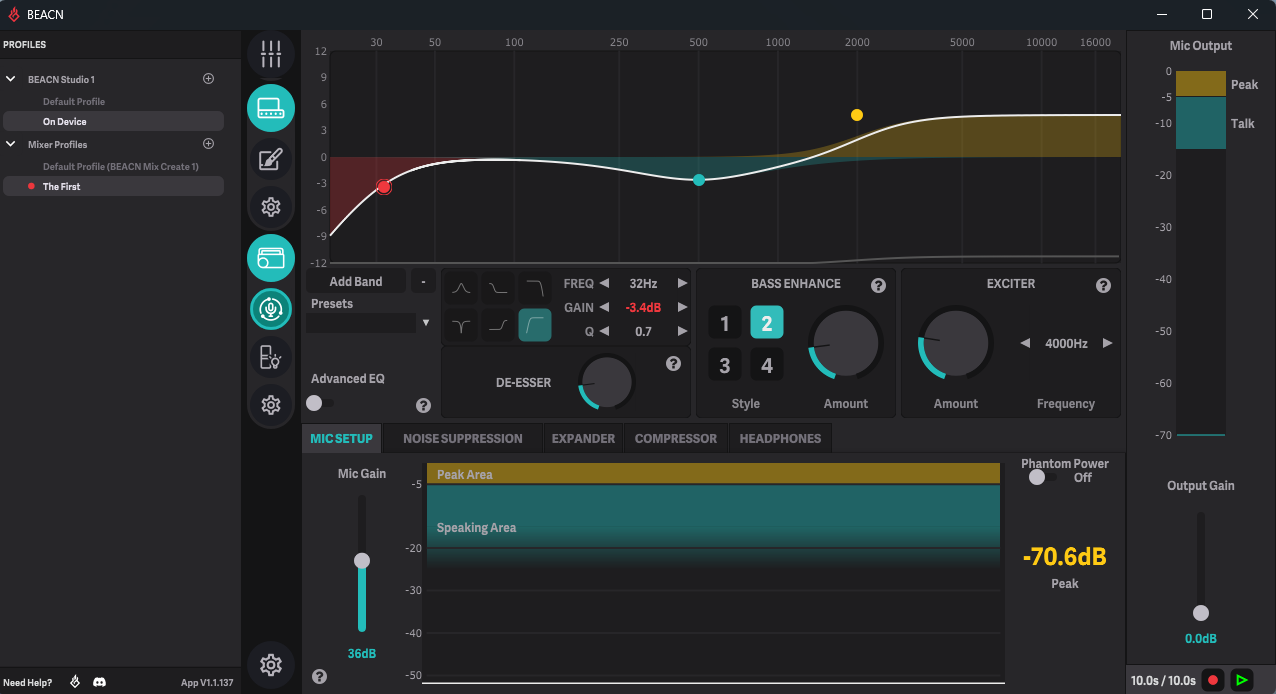
The best part? All of this happens on the device. No CPU drain, no software plugins. And the difference is immediately noticeable. My mic signal went from “pretty good” to “damn, that’s broadcast quality” with just a few tweaks.
You also get the option to monitor in real time with zero latency. The headphone amp pushes a clean signal with up to 85mW into 33?, which made monitoring on my SHURE SE215 Pro both comfortable and detailed. The BEACN App is one of the most powerful and well-thought-out pieces of companion software I’ve used in an audio product. The ability to create multiple submixes, assign sources to different outputs, and configure mute behaviors (like “mute to stream only”) makes this a streamer’s dream. It’s also surprisingly user-friendly. You don’t need an audio engineering degree to understand it. Want Discord on your stream but not in your headphones? Drag it to the stream mix and mute it in your headphone mix. Done.
But—and this is a frustrating “but”—I ran into occasional issues with the app not saving my custom EQ settings or profiles. At first, I thought I was doing something wrong. But nope—after setting up a killer profile for the CHERRY NALE X mic, I came back the next day and found my settings gone. I’ve had to redo my EQ profile multiple times because of this hiccup. BEACN has a solid support team and an active community, so I’m hopeful they’ll squash this in an update soon. But it’s worth flagging if you’re someone who switches mics often or likes to tinker with sound profiles.
Effortless Content Creation
In my day-to-day use, BEACN Studio has been a workhorse. I’ve used it for:
- Streaming: The submixes allow me to give viewers one mix, my Discord squad another, and myself yet another. Nobody’s hearing alerts they shouldn’t.
- Gaming: Using the dual USB setup, I can game on one PC while handling Discord and OBS on another. Seamless.
- Zoom Calls: The noise suppression and limiter make even casual work calls sound polished, which is always a plus.

No crashes, no glitches, and the audio has never cut out. That kind of reliability in a creator’s tool is priceless.
You get everything you need to get rolling:
- BEACN Studio Interface
- USB-C to USB-C Cable (1.5m)
- USB-C to USB-A Adapter
- Quick Start Guide
Honestly, I appreciate the fact that they don’t skimp here. The included cable is long enough and good quality, and the adapter means it’ll work on older machines too.
- Content creators who want broadcast-quality sound without a rack of gear.
- Dual-PC streamers who need simple, reliable routing.
- Podcasters and voice actors looking for an all-in-one interface with real-time DSP.
- Anyone who’s outgrown the GoXLR and is looking for the next evolution in creator-focused audio gear.
REVIEW SCORE: 9/10
BEACN Studio is one of the few devices that feels like it was designed by creators, for creators. It nails the essentials—great audio quality, simple routing, powerful processing—and wraps it in a compact package that doesn’t look like it belongs in a music studio from the ‘90s.
Sure, the app’s tendency to occasionally forget your profiles is annoying. And yes, if you’re using a less common mic like the CHERRY NALE X, setup can take a little finessing. But those are software issues that can be fixed with updates. The hardware? Rock solid.
For more on BEACN and gaming, follow my socials here – I also stream Mon, Tues, T hurs, Fri 10pm ET over on Twitch, Tiktok and Youtube.

